Functions and Lambda Functions

General and Anonymous Functions in Python

Oliver Bonham-Carter

On For Today

Let’s build from general functions to elegant lambda syntax!

Topics covered in today’s discussion:

  • 🐍 What are Functions? - General functions explained
  • 🐍 Functions Without Return Values - Quick action-oriented example
  • 🐍 Functions That Return Values - Quick value-producing example
  • 🐍 What are Lambda Functions? - Anonymous functions explained
  • 🐍 Basic Lambda Syntax - The foundation you need
  • 🐍 Lambda vs Regular Functions - When to use each
  • 🐍 Lambda with Built-in Functions - map(), filter(), sorted()
  • 🐍 Real-World Applications - Practical uses in data processing
  • 🐍 Best Practices - Writing clean, readable lambda expressions

Get Ready for Functions and Lambda Functions!

What Are Functions in Python?

General Idea

A function is a reusable block of code that performs a specific task.

  • It helps you organize code into smaller parts.
  • It avoids repeating the same logic over and over.
  • You can give it inputs (parameters), and it may produce an output.

Mental model: define once with def, call many times when needed.

The Function Structure

The Basic Structure

A function in Python is defined using the def keyword, followed by the function name, parentheses for parameters, and a colon. The body of the function is indented.

def function_name(parameters):
    # The function body uses parameters to perform actions
    # that create local variables, calculations, etc.
    # A variable may be returned as necessary.

    return value  # Return the value if you want to send something back to the caller

function_name(arguments)  # Calling the function.

What happens?

  • The function performs an action: returns a value or prints a message.
  • The function is called by its name: function_name().
  • A value is returned if return is used; otherwise, Python returns None.

The say_hello() Function Example

def say_hello(to_name):
    """Prints a simple greeting."""
    print(f"Hello, {to_name}! Welcome to Python functions.")

# Calling the function
say_hello("Alice")

What happens?

  • The function performs an action: it prints a message.
  • It does not use return, so Python gives back None (if we try to check the return value).

Quick Example: Function That Returns a Value

Like, what are functions that return values?

Value-Producing Function
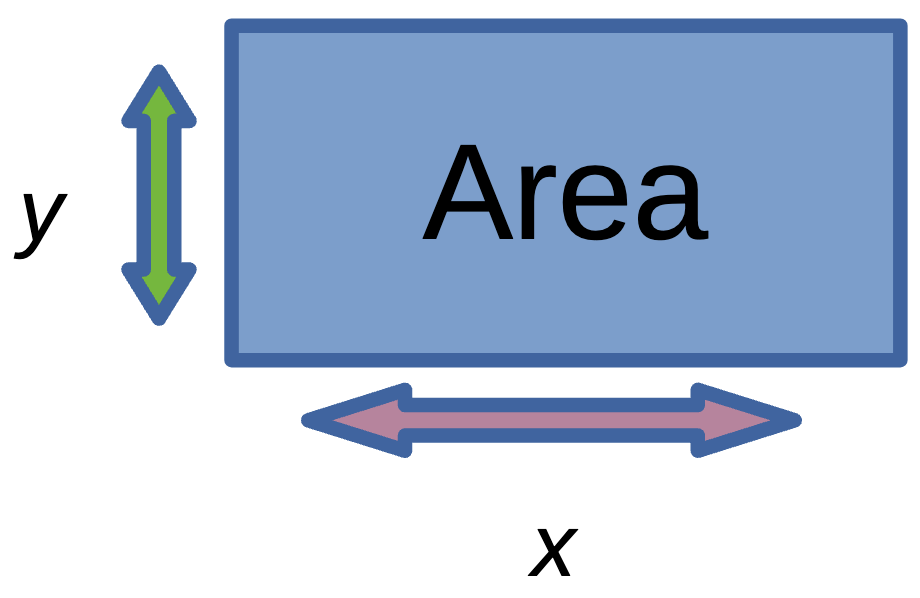
def area_of_rectangle(length, width):
    return length * width

myWidth = 5
myLength = 3
area = area_of_rectangle(myLength, myWidth)
print(area)

What happens?

  • The function computes a value.
  • return sends that value back to the caller.

What Are Lambda Functions?

Definition

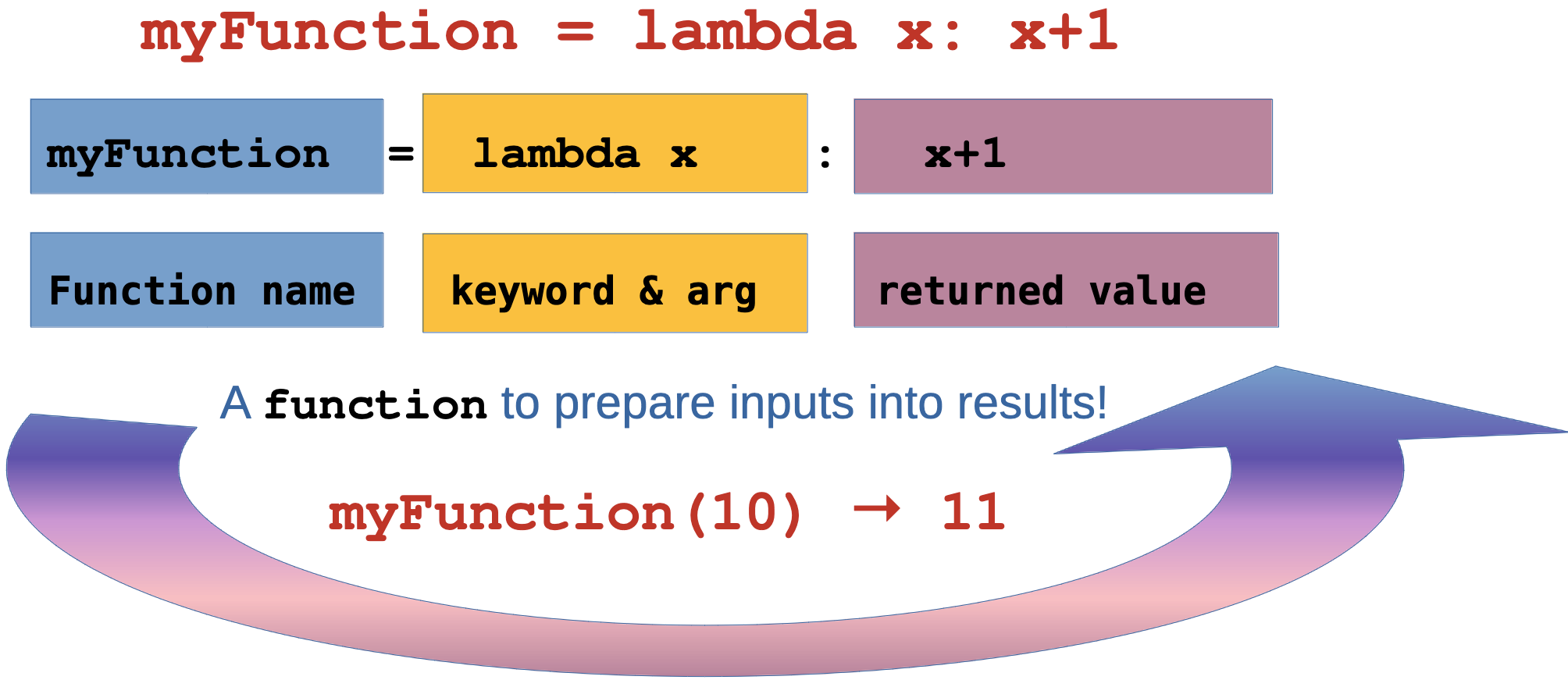
Lambda functions are small, anonymous functions that can have any number of arguments but can only have one expression. They’re perfect for short, simple operations!

  • Think of them as: Mathematical functions like f(x) = x² + 1.
  • They are functions that are simple, direct, and to the point!

Lambda Functions: The Concept

Specifics of Lambda Functions

Important

Limitations:

  • Lambda functions are restricted to a single expression.
  • They cannot contain statements like assignments, if-else, or for loops within their definition.
  • They are primarily used for simple, short operations.
  • For more complex logic, a named function is more appropriate;
    • def myFunction():

Lambda Functions: The Basics

Basic Syntax

# Lambda syntax: lambda arguments: expression

# Regular function
def square(x):
    return x * x

# Lambda equivalent
square_lambda = lambda x: x * x

# Using both
print(square(5))        # Output: 25
print(square_lambda(5)) # Output: 25

Key Point: Lambda functions are expressions, not statements - they return a value immediately!

Lambda Functions: Multiple Arguments

More Examples

# Multiple arguments
add = lambda x, y: x + y
multiply = lambda x, y, z: x * y * z

# With default arguments
greet = lambda name="World": f"Hello, {name}!"

print(add(3, 5))           # Output: 8
print(multiply(2, 3, 4))   # Output: 24
print(greet())             # Output: Hello, World!
print(greet("Alice"))      # Output: Hello, Alice!

Why this works: Lambda functions can handle multiple parameters just like regular functions!

🤝 Quick Challenge #1 (2 minutes)

Warning

Challenge: Create lambda functions for these operations:

  1. A lambda that calculates the area of a circle: π * r²
  2. A lambda that converts Fahrenheit to Celsius: (f - 32) * 5/9
  3. A lambda that finds the maximum max() of three numbers
  4. A lambda that finds the minimum min() of three numbers

Starter Code:

import math

# Your lambda functions here
circle_area = lambda r: # Complete this
fahrenheit_to_celsius = lambda f: # Complete this  
max_three = lambda a, b, c: # Complete this
min_three = lambda a, b, c: # Complete this

# Test your functions
print(circle_area(5))
print(fahrenheit_to_celsius(68))
print(max_three(10, 20, 15))
print(min_three(10, 20, 15))

Challenge #1 Solutions

Solutions

import math

# Solution 1: Circle area
circle_area = lambda r: math.pi * r * r

# Solution 2: Fahrenheit to Celsius
fahrenheit_to_celsius = lambda f: (f - 32) * 5/9

# Solution 3: Maximum of three numbers
max_three = lambda a, b, c: max(a, max(b, c))
# Alternative: max_three = lambda a, b, c: max(a, b, c)

# Solution 4: Minimum of three numbers (in a list)
myVals = [10, 20, 15]
min_three = lambda thisValue: min(thisValue)
print(myVals)
print(min_three(myVals))

# Test results
print(f"Circle area (r=5): {circle_area(5):.2f}")      # 78.54
print(f"68°F in Celsius: {fahrenheit_to_celsius(68)}")  # 20.0
print(f"Max of 10,20,15: {max_three(10, 20, 15)}")     # 20
print(f"Min of 10,20,15: {min_three(10, 20, 15)}")     # 10

Meet Some Handy Functions! 👋

Essential Built-in Functions

🗺️ map(function, iterable)
Applies a function to every item in a list/iterable
Think: “Transform every item”

🔍 filter(function, iterable)
Keeps only items where function returns True
Think: “Keep only items that pass the test”

📊 sorted(iterable, key=function)
Returns a new sorted list using function for comparison
Think: “Arrange items by custom criteria”

📋 list(iterable)
Converts any iterable (map/filter results) into a list
Think: “Make it a proper list I can print/use”

Simple sorted() Example

sorted() with a Lambda Key

sorted() returns a new list in order. The key function tells Python what value to compare.

students = [("Emil", 25), ("Tobias", 22), ("Linus", 28)]
# Sort by age (the second element in the tuple)
sorted_students = sorted(students, key=lambda x: x[1])
# Output: [('Tobias', 22), ('Emil', 25), ('Linus', 28)]
print(sorted_students)

A Complicated Example of Lambda with sorted()

Custom Sorting Logic

# Sort with custom criteria
students = [
    {"name": "Alice", "grade": 85},
    {"name": "Bob", "grade": 92},
    {"name": "Charlie", "grade": 78},
    {"name": "Diana", "grade": 96}
]

words = ["banana", "pie", "Washington", "book"]

# Sort students by grade (descending)
by_grade = sorted(students, key=lambda student: student["grade"], reverse=True)
print("Top student:", by_grade[0]["name"])  # Diana

# Sort words by length
by_length = sorted(words, key=lambda word: len(word))
print(f"By length: {by_length}")  # ['pie', 'book', 'banana', 'Washington']

# Sort words by last letter
by_last_letter = sorted(words, key=lambda word: word[-1])
print(f"By last letter: {by_last_letter}")  # ['banana', 'pie', 'book', 'Washington']

Simple filter() and List() Example

filter() Keeps What Passes

filter() keeps items where the lambda returns True and list() converts the filter result into a list.

numbers = [1, 2, 3, 4, 5, 6]
# Keep only even numbers
evens = list(filter(lambda x: x % 2 == 0, numbers))
# Output: [2, 4, 6]
print(evens)

A Complicated Example of Lambda with filter() and list()

Keep Only What You Want

# Filter elements based on condition
numbers = [1, 2, 3, 4, 5, 6, 7, 8, 9, 10]
words = ["apple", "banana", "cherry", "date", "elderberry"]

# Keep only even numbers
evens = list(filter(lambda x: x % 2 == 0, numbers))
print(f"Evens: {evens}")  # [2, 4, 6, 8, 10]

# Keep only long words
long_words = list(filter(lambda word: len(word) > 5, words))
print(f"Long words: {long_words}")  # ['banana', 'cherry', 'elderberry']

# Keep positive numbers
mixed = [-3, -1, 0, 2, 5, -7, 9]
positives = list(filter(lambda x: x > 0, mixed))
print(f"Positives: {positives}")  # [2, 5, 9]

Simple map() Example

map() Transforms Every Item

map() applies the lambda to each item and returns a new sequence.

numbers = [1, 2, 3, 4]
# Double each number
doubled = list(map(lambda x: x * 2, numbers))
# Output: [2, 4, 6, 8]
print(f"Doubled: {doubled}")

A Complicated Example of Lambda with map()

Transform All Elements

# Transform all elements in a list
numbers = [1, 2, 3, 4, 5]
names = ["alice", "bob", "charlie"]

# Square all numbers
squared = list(map(lambda x: x**2, numbers))
print(f"Squared: {squared}")  # [1, 4, 9, 16, 25]

# Capitalize all names
capitalized = list(map(lambda name: name.title(), names))
print(f"Capitalized: {capitalized}")  # ['Alice', 'Bob', 'Charlie']

# Multiple lists
nums1 = [1, 2, 3]
nums2 = [4, 5, 6]
sums = list(map(lambda x, y: x + y, nums1, nums2))
print(f"Sums: {sums}")  # [5, 7, 9]

Lambda vs Regular Functions

When to Use Each

Lambda: For simple, one-line operations that you’ll use briefly
Regular Functions: For complex logic, multiple statements, or reusable code

Rule of thumb: If you can’t explain what the function does in one sentence, use a regular function; e.g., def myFunction():

Lambda vs Regular: Comparison

Side-by-Side Comparison

# ✅ Good use of lambda - simple, clear
numbers = [1, 2, 3, 4, 5]
squared = list(map(lambda x: x**2, numbers))
print(f"squared is {squared}")

# ❌ Bad use of lambda - too complex
complex_lambda = lambda x: x**2 if x > 0 else -x**2 if x < 0 else 0
for x in range(6):
    print(f"complex_lambda, x={x}, value={complex_lambda(x)}")

# ✅ Better as regular function
def process_number(x):
    if x > 0:
        return x**2
    elif x < 0:
        return -x**2
    else:
        return 0
for i in range(10): print(f"processed number[{i}] -> {process_number(i)}")

Remember: Lambda functions should be simple and readable!

Lambda with Built-in Functions

The Power Combination

Lambda functions really shine when used with Python’s built-in functions like map(), filter(), and sorted()!

Why this matters: These combinations let you process data efficiently with minimal code

🤝 Quick Challenge #2 (3 minutes)

Your Turn: Lambda with Built-ins

Challenge: Use lambda functions with map(), filter(), and sorted():

# Given data
temperatures_f = [32, 68, 86, 104, 212]  # Fahrenheit
prices = [10.99, 23.45, 5.67, 45.00, 12.34]
products = [
    {"name": "laptop", "price": 999.99, "rating": 4.5},
    {"name": "mouse", "price": 25.50, "rating": 4.2},
    {"name": "keyboard", "price": 75.00, "rating": 4.8},
    {"name": "monitor", "price": 299.99, "rating": 4.3}
]

# Your tasks:
# 1. Convert temperatures to Celsius using map()
# 2. Find prices under $20 using filter()
# 3. Sort products by rating (highest first) using sorted()

Challenge #2 Solutions

Solutions

# 1. Convert temperatures to Celsius
celsius = list(map(lambda f: (f - 32) * 5/9, temperatures_f))
print(f"Celsius: {[round(temp, 1) for temp in celsius]}")
# [0.0, 20.0, 30.0, 40.0, 100.0]

# 2. Find prices under $20
cheap_prices = list(filter(lambda price: price < 20, prices))
print(f"Under $20: {cheap_prices}")  # [10.99, 5.67, 12.34]

# 3. Sort products by rating (highest first)
by_rating = sorted(products, key=lambda p: p["rating"], reverse=True)
print("Best rated:", by_rating[0]["name"])  # keyboard
for product in by_rating:
    print(f"{product['name']}: {product['rating']}")

More Handy Functions! 🎯

Additional Built-in Functions

➕ sum(iterable)
Adds up all numbers in a list/iterable
Think: “Give me the total of all these numbers”

🔍 len(iterable)
Returns the count of items in a collection
Think: “How many items are there?”

🏆 max(iterable, key=function)
Finds the largest item (optionally using key function)
Think: “Which item is the biggest/best?”

🎲 set(iterable)
Creates a collection with only unique items
Think: “Remove all duplicates”

Fun Fact: These functions work great with the results from map() and filter()!

Simple sum() Example

sum() Adds Values Together

sum() returns the total of numeric items in an iterable.

quiz_scores = [8, 9, 10, 7, 6]
total_points = sum(quiz_scores)
print(total_points)  # 40

Simple len() Example

len() Counts Items

len() tells you how many items are in a list, string, or other collection.

topics = ["functions", "lambda", "map", "filter"]
topic_count = len(topics)
print(topic_count)  # 4

Simple max() Example

max() Finds the Largest Item

With key=, max() can choose the “largest” item using custom logic.

words = ["cat", "giraffe", "dog", "elephant"]
longest_word = max(words, key=lambda w: len(w))
print(longest_word)  # elephant

Simple set() Example

set() Removes Duplicates

set() creates a collection of unique values.

colors = ["red", "blue", "red", "green", "blue", "yellow"]
unique_colors = set(colors)
print(unique_colors)  # Order may vary, e.g., {'red', 'blue', 'green', 'yellow'}

Note: The order of items in a set may appear differently each time you print it.

Real-World Example 1

Sales Data Processing

# Sales data from a CSV or database
sales_data = [
    {"product": "Laptop", "price": 999.99, "quantity": 2, "discount": 0.1},
    {"product": "Mouse", "price": 25.50, "quantity": 5, "discount": 0.0},
    {"product": "Keyboard", "price": 75.00, "quantity": 3, "discount": 0.05},
    {"product": "Monitor", "price": 299.99, "quantity": 1, "discount": 0.15}
]

# Calculate total revenue with discounts
total_revenue = sum(map(
    lambda sale: sale["price"] * sale["quantity"] * (1 - sale["discount"]),
    sales_data
))
print(f"Total Revenue: ${total_revenue:.2f}")

# Find high-value sales (over $200 after discount)
high_value = list(filter(
    lambda sale: sale["price"] * sale["quantity"] * (1 - sale["discount"]) > 200,
    sales_data
))
print(f"High-value sales: {len(high_value)}")

Real-World Example 1 Output:

Total Revenue: $2396.22
High-value sales: 3

Real-World Example 2

Web Development

# User registration data
users = [
    {"email": "[email protected]", "age": 25, "active": True},
    {"email": "[email protected]", "age": 17, "active": False},
    {"email": "[email protected]", "age": 30, "active": True},
    {"email": "[email protected]", "age": 16, "active": True}
]

# Get active adult users
active_adults = list(filter(
    lambda user: user["active"] and user["age"] >= 18,
    users
))

# Extract just the email addresses
adult_emails = list(map(lambda user: user["email"], active_adults))
print("Adult user emails:", adult_emails)

# Sort users by age
by_age = sorted(users, key=lambda user: user["age"])
print("Youngest user:", by_age[0]["email"])

Real-World Example 2 Output:

Adult user emails: ['[email protected]', '[email protected]']
Youngest user: [email protected]

Real-World Example 3

Analytic Computing

import math

# Experimental data points
data_points = [
    {"x": 1, "y": 2.1, "error": 0.1},
    {"x": 2, "y": 4.2, "error": 0.2},
    {"x": 3, "y": 5.8, "error": 0.15},
    {"x": 4, "y": 8.1, "error": 0.25}
]

# Calculate distances from origin
distances = list(map(
    lambda point: math.sqrt(point["x"]**2 + point["y"]**2),
    data_points
))

# Filter points with low error (high precision)
precise_points = list(filter(
    lambda point: point["error"] < 0.2,
    data_points
))

# Sort by significance (y/error ratio)
by_significance = sorted(
    data_points,
    key=lambda point: point["y"] / point["error"],
    reverse=True
)
print("Most significant point:", by_significance[0])

Real-World Example 3 Output:

Most significant point: {'x': 3, 'y': 5.8, 'error': 0.15}

Lambda Best Practices

Writing Clean Lambda Functions

Follow these guidelines to write maintainable and readable lambda expressions.

Remember: Code is read more often than it’s written - prioritize clarity!

Lambda Best Practices: Do’s and Don’ts

Guidelines

✅ DO: Use lambdas for simple, single-expression operations

# Simple, clear operations
numbers = [1, 2, 3, 4, 5]
squared = list(map(lambda x: x**2, numbers))
evens = list(filter(lambda x: x % 2 == 0, numbers))

# Short data transformations
users = [{"name": "Alice", "age": 25}]
names = list(map(lambda u: u["name"], users))

❌ DO NOT: Make lambdas too complex or use them for multi-step logic

# Too complex for lambda
complex_func = lambda x: x**2 if x > 0 else abs(x) if x < 0 else "zero"

# Multiple statements (impossible in lambda anyway)
# This won't work:
# bad_lambda = lambda x: print(x); return x**2

Lambda Limitations and Alternatives

When Lambda Is not Enough

# ❌ Lambda cannot do multiple statements
# Need regular function for this:
def process_grade(score):
    print(f"Processing score: {score}")  # Side effect
    if score >= 90:
        return "A"
    elif score >= 80:
        return "B"
    else:
        return "C"

# ✅ Lambda for simple conditions
grade_simple = lambda score: "Pass" if score >= 60 else "Fail"

# ❌ Lambda cannot include assignments
# Need regular function:
def calculate_with_logging(x):
    result = x**2 + 2*x + 1  # Assignment
    print(f"Calculated: {result}")
    return result

Summary: Lambda Functions Mastery

What You’ve Learned Today

🎯 Core Concepts: * Lambda functions are anonymous, single-expression functions * Perfect for simple operations and data transformations * Excellent with map(), filter(), and sorted()

🛠️ Practical Skills: * Data processing and filtering * Custom sorting logic * Functional programming patterns * Real-world application scenarios

📝 Best Practices: * Keep lambdas simple and readable * Use regular functions for complex logic * Prioritize code clarity over cleverness

Challenges

Challenge 1: Quick Lambda Warmup

Your Turn

Write lambdas for each task.

import math

# 1. Rectangle area
area_rect = lambda w, h: # finish

# 2. Apply a 15% discount
discount_price = lambda price: # finish

# 3. Create initials from first and last name
initials = lambda first, last: # finish

print(area_rect(8, 5))
print(discount_price(40))
print(initials("Ada", "Lovelace"))

Challenge 2: map() + filter() Practice

Your Turn

Use map() and filter() to process the scores.

scores = [62, 71, 88, 95, 54, 77, 83]

# 1. Curve every score by +5 (max 100)
# 2. Keep only passing scores (>= 70)
# 3. Print how many passing scores remain

Challenge 3: Sorting with Lambda

Your Turn

Sort the city list in two different ways.

cities = [
    ("Tokyo", 37400068),
    ("Delhi", 28514000),
    ("Shanghai", 25582000),
    ("Sao Paulo", 21650000)
]

# 1. Sort by population (highest first)
# 2. Sort by city name length (shortest first)

Challenge 4: Chaining Functions

Your Turn

Use filter() then map() to clean the words list.

words = ["apple", "kiwi", "orange", "fig", "grape", "apricot"]

# 1. Keep only words with length >= 5
# 2. Convert the remaining words to uppercase
# 3. Sort the result by length

Challenge 5: Mini Data Task

Your Turn

Process the trip data using lambdas.

trips = [
    {"driver": "Asha", "miles": 120, "rate": 0.62},
    {"driver": "Ben", "miles": 45, "rate": 0.62},
    {"driver": "Chen", "miles": 200, "rate": 0.62},
    {"driver": "Dia", "miles": 80, "rate": 0.62}
]

# 1. Compute the payout for each trip (miles * rate)
# 2. Keep only trips with payout >= 60
# 3. Print the driver names for those trips

Challenge Solutions

Challenge 1 Solution

Solution + Why It Works

import math

area_rect = lambda w, h: w * h
discount_price = lambda price: price * 0.85
initials = lambda first, last: f"{first[0]}{last[0]}"

print(area_rect(8, 5))
print(discount_price(40))
print(initials("Ada", "Lovelace"))

How it works: Each lambda is one expression. The discount multiplies by \(1 - 0.15\), and the initials slice the first character from each name.

Challenge 2 Solution

Solution + Why It Works

scores = [62, 71, 88, 95, 54, 77, 83]

curved = list(map(lambda s: min(s + 5, 100), scores))
passing = list(filter(lambda s: s >= 70, curved))

print(curved)
print(passing)
print(len(passing))

How it works: map() adjusts every score, min() caps at 100, and filter() keeps only passing values.

Challenge 3 Solution

Solution + Why It Works

cities = [
    ("Tokyo", 37400068),
    ("Delhi", 28514000),
    ("Shanghai", 25582000),
    ("Sao Paulo", 21650000)
]

by_pop = sorted(cities, key=lambda c: c[1], reverse=True)
by_name_len = sorted(cities, key=lambda c: len(c[0]))

print(by_pop)
print(by_name_len)

How it works: The key function picks the sort value: population at index 1 or the length of the name at index 0.

Challenge 4 Solution

Solution + Why It Works

words = ["apple", "kiwi", "orange", "fig", "grape", "apricot"]

long_words = list(filter(lambda w: len(w) >= 5, words))
upper_words = list(map(lambda w: w.upper(), long_words))
sorted_words = sorted(upper_words, key=lambda w: len(w))

print(sorted_words)

How it works: filter() trims the list, map() transforms each item, and sorted() orders by length using a lambda key.

Challenge 5 Solution

Solution + Why It Works

trips = [
    {"driver": "Asha", "miles": 120, "rate": 0.62},
    {"driver": "Ben", "miles": 45, "rate": 0.62},
    {"driver": "Chen", "miles": 200, "rate": 0.62},
    {"driver": "Dia", "miles": 80, "rate": 0.62}
]

payouts = list(map(lambda t: {**t, "payout": t["miles"] * t["rate"]}, trips))
high_payouts = list(filter(lambda t: t["payout"] >= 60, payouts))
drivers = list(map(lambda t: t["driver"], high_payouts))

print(drivers)

How it works: First add a computed field, then filter by it, then map to just the names.

Congrats!

🎉 Congratulations! You’ve mastered Python’s lambda functions!