More On Lists, Dictionaries; Comprehensions, and Sets
Data structures are containers that help you organize, store, and access your data in different ways.
Think of them as:
Important
len(myList) - 1).Example:
Lists are ordered, mutable collections that can hold items of any type.
Note
Key Features:
[]"""
This example shows how to create and access lists.
"""
# Creating lists
fruits = ["apple", "banana", "cherry"]
numbers = [1, 2, 3, 4, 5]
mixed = [1, "hello", 3.14, True]
empty = []
# Accessing elements (zero-indexed!)
print(fruits[0]) # Output: apple
print(fruits[-1]) # Output: cherry (last item)
print(numbers[1:4]) # Output: [2, 3, 4] (slicing)This code demonstrates creating different types of lists and accessing their elements.
"""
This example shows how to modify lists.
"""
colors = ["red", "green", "blue"]
# Adding items
colors.append("yellow") # Add to end
colors.insert(1, "orange") # Insert at index 1
# Removing items
colors.remove("green") # Remove by value
last_color = colors.pop() # Remove and return last item
# Changing items
colors[0] = "purple"
print(colors)
# Output: ['purple', 'orange', 'blue']Lists are flexible - you can add, remove, and change items easily!
"""
This example shows common list operations.
"""
nums = [3, 1, 4, 1, 5, 9, 2]
# Useful operations
print(len(nums)) # Output: 7 (length)
print(max(nums)) # Output: 9 (maximum)
print(min(nums)) # Output: 1 (minimum)
print(nums.count(1)) # Output: 2 (count occurrences)
# Sorting
nums.sort() # Sort in place
print(nums) # Output: [1, 1, 2, 3, 4, 5, 9]
# Reversing
nums.reverse()
print(nums) # Output: [9, 5, 4, 3, 2, 1, 1]These operations make lists powerful for data manipulation!
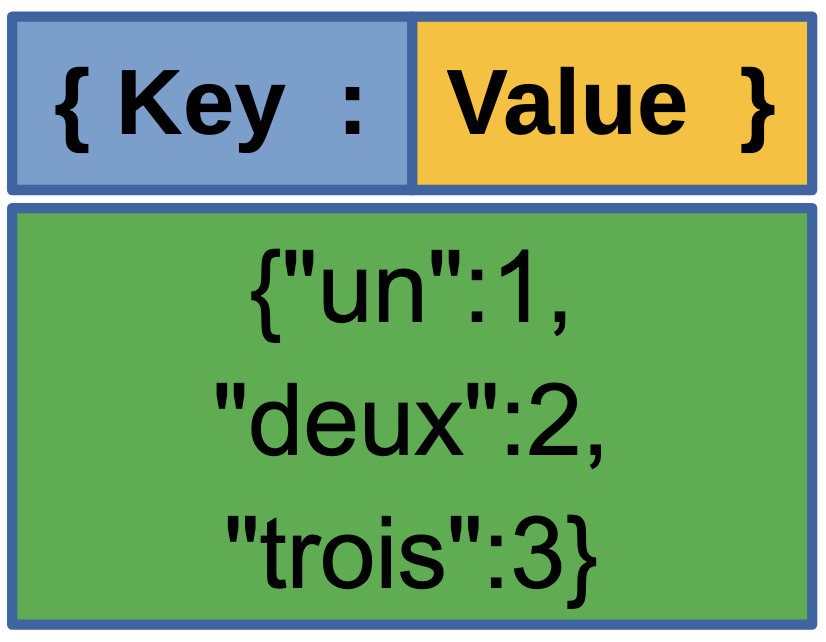
Dictionaries store data as key-value pairs, like a real dictionary stores words and definitions.
Note
Key Features:
{}"""
This example shows how to create and access dictionaries.
"""
# Creating dictionaries
student = {
"name": "Alice",
"age": 20,
"major": "Computer Science"
}
# Accessing values
print(student["name"]) # Output: Alice
print(student.get("age")) # Output: 20
print(student.get("gpa", 0.0)) # Output: 0.0 (default if key missing)
# Getting all keys and values
print(student.keys()) # Output: dict_keys(['name', 'age', 'major'])
print(student.values()) # Output: dict_values(['Alice', 20, 'Computer Science'])Dictionaries let you look up values quickly using keys!
"""
This example shows how to modify dictionaries.
"""
inventory = {"apples": 5, "bananas": 3}
# Adding or updating items
inventory["oranges"] = 7 # Add new key-value pair
inventory["apples"] = 10 # Update existing value
# Removing items
del inventory["bananas"] # Delete key-value pair
quantity = inventory.pop("oranges") # Remove and return value
# Checking if key exists
if "apples" in inventory:
print(f"We have {inventory['apples']} apples")
# Output: We have 10 apples
print(inventory)
# Output: {'apples': 10}Dictionaries make it easy to manage related data!
"""
This example shows how to iterate through dictionaries.
"""
grades = {"Alice": 95, "Bob": 87, "Charlie": 92}
# Iterate through keys
for name in grades:
print(name)
# Iterate through values
for grade in grades.values():
print(grade)
# Iterate through key-value pairs
for name, grade in grades.items():
print(f"{name} scored {grade}")
# Output:
# Alice scored 95
# Bob scored 87
# Charlie scored 92Dictionaries are perfect for storing related information!
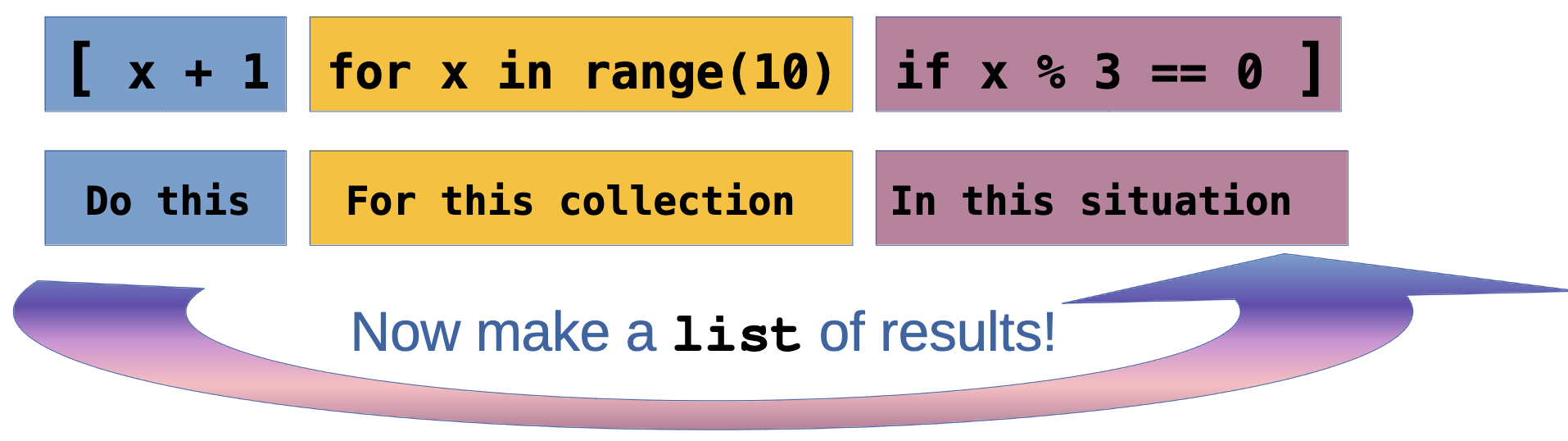
List comprehensions provide a concise way to create lists based on existing lists or ranges.
"""
This example shows basic list comprehensions.
"""
# Traditional way: create squares
squares_old = []
for x in range(1, 6):
squares_old.append(x ** 2)
# List comprehension way
squares_new = [x ** 2 for x in range(1, 6)]
print(squares_new)
# Output: [1, 4, 9, 16, 25]
# Even simpler examples
evens = [x for x in range(10) if x % 2 == 0]
print(evens)
# Output: [0, 2, 4, 6, 8]
upper_words = [word.upper() for word in ["hello", "world"]]
print(upper_words)
# Output: ['HELLO', 'WORLD']List comprehensions make your code cleaner and more Pythonic!
"""
This example shows more complex list comprehensions.
"""
# Nested list comprehension
matrix = [[i * j for j in range(1, 4)] for i in range(1, 4)]
print(matrix)
# Output: [[1, 2, 3], [2, 4, 6], [3, 6, 9]]
# With multiple conditions
nums = [x for x in range(20) if x % 2 == 0 if x % 3 == 0]
print(nums)
# Output: [0, 6, 12, 18]List comprehensions can handle complex transformations elegantly!
# Using if-else in comprehension
labels = ["even" if x % 2 == 0 else "odd" for x in range(5)]
print(labels)
# Output: ['even', 'odd', 'even', 'odd', 'even']
# Flattening a list
nested = [[1, 2], [3, 4], [5, 6]]
flat = [item for sublist in nested for item in sublist]
print(flat)
# Output: [1, 2, 3, 4, 5, 6]List comprehensions also help to make code more clean.
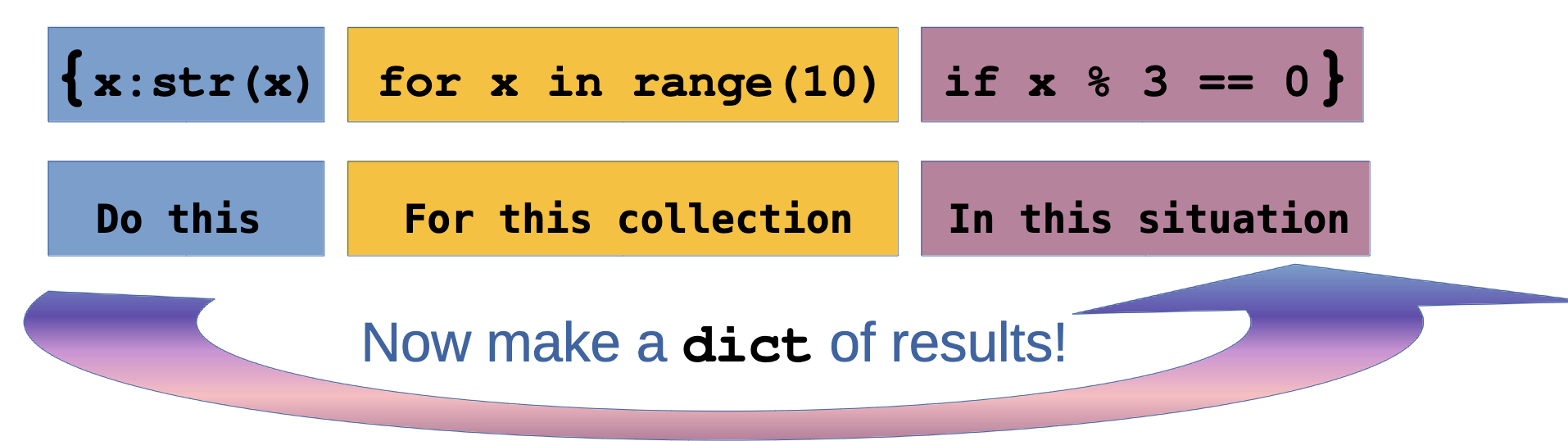
Dictionary comprehensions create dictionaries in a concise, readable way.
"""
This example shows dictionary comprehensions.
"""
# Create a dictionary from a list
numbers = [1, 2, 3, 4, 5]
squares_dict = {x: x ** 2 for x in numbers}
print(squares_dict)
# Output: {1: 1, 2: 4, 3: 9, 4: 16, 5: 25}
# With condition
evens_dict = {x: x ** 2 for x in numbers if x % 2 == 0}
print(evens_dict)
# Output: {2: 4, 4: 16}
# Swap keys and values
original = {"a": 1, "b": 2, "c": 3}
swapped = {value: key for key, value in original.items()}
print(swapped)
# Output: {1: 'a', 2: 'b', 3: 'c'}
# Transform values
prices = {"apple": 0.5, "banana": 0.3, "orange": 0.7}
dollars = {item: price * 100 for item, price in prices.items()}
print(dollars)
# Output: {'apple': 50.0, 'banana': 30.0, 'orange': 70.0}Dictionary comprehensions make creating and transforming dictionaries easy!
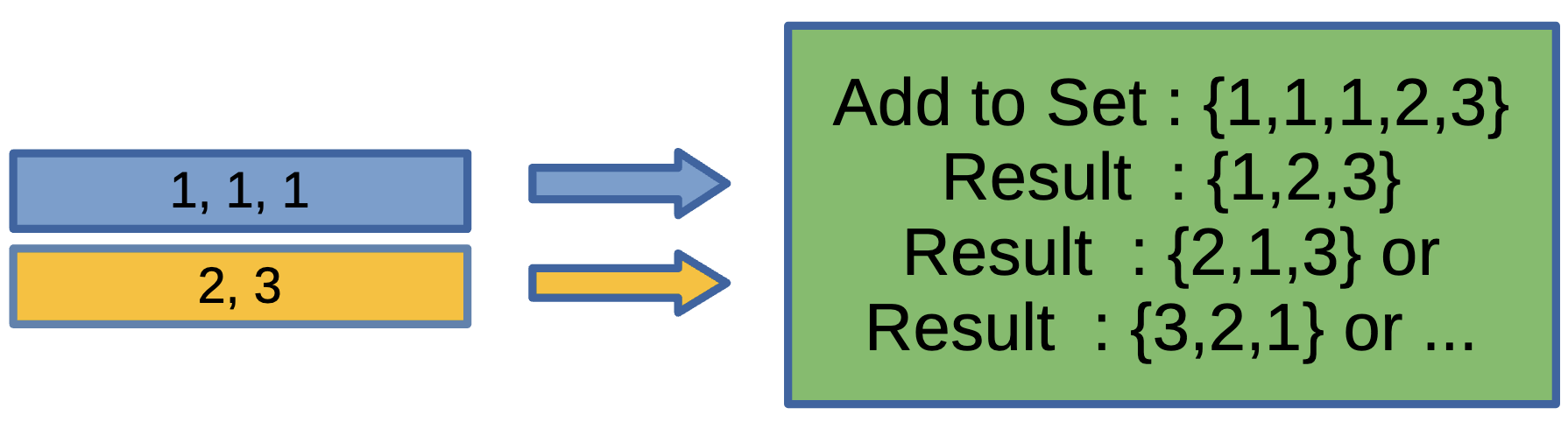
Sets are unordered collections of unique elements.
Key Features:
{} or set()Sets are perfect when you need unique values!
# Adding and removing
fruits.add("orange")
fruits.remove("banana") # Error if not found
fruits.discard("grape") # No error if not found
print(fruits)
# Output: {'apple', 'cherry', 'orange'}
# Membership testing (very fast!)
print("apple" in fruits) # Output: True
print("banana" in fruits) # Output: False
# Length
print(len(fruits)) # Output: 3Sets can be configured in many ways except for their order.
"""
This example shows mathematical set operations.
"""
set_a = {1, 2, 3, 4, 5}
set_b = {4, 5, 6, 7, 8}
# Union (all elements from both sets)
union = set_a | set_b
print(union)
# Output: {1, 2, 3, 4, 5, 6, 7, 8}
# Intersection (elements in both sets)
intersection = set_a & set_b
print(intersection)
# Output: {4, 5}Sets support powerful mathematical operations!
"""
This example shows set comprehensions.
"""
# Create a set using comprehension
squares_set = {x ** 2 for x in range(10)}
print(squares_set)
# Output: {0, 1, 4, 9, 16, 25, 36, 49, 64, 81}
# With condition
even_squares = {x ** 2 for x in range(10) if x % 2 == 0}
print(even_squares)
# Output: {0, 4, 16, 36, 64}Set comprehensions are great for removing duplicates!
# Remove duplicates from a list
words = ["apple", "banana", "apple", "cherry", "banana"]
unique_words = {word for word in words}
print(unique_words)
# Output: {'apple', 'banana', 'cherry'}
# Characters in a string (unique)
text = "hello world"
unique_chars = {char for char in text if char != ' '}
print(unique_chars)
# Output: {'h', 'e', 'l', 'o', 'w', 'r', 'd'}Set comprehensions are all about “Unique” values!
Time to practice your data structure skills!

Create a list of numbers from 1 to 10. Write code that:
Hint: Use append(), remove(), sum(), and slicing or reverse()
Create a dictionary with student information (name, age, grade, major). Write code that:
Hint: Use dictionary methods like in, .items(), and bracket notation
Using list comprehensions, create:
["Python", "Java", "Ruby", "Go"][(1, 1), (2, 8), ...]Hint: Use [expression for item in iterable if condition] format
Create a dictionary comprehension that:
["red", "green", "blue", "yellow"] and creates a dictionary where keys are the colors and values are their lengths{"morning": 20, "afternoon": 25, "evening": 18}, create a new dictionary with temperatures in Fahrenheit (F = C * 9/5 + 32)Hint: Use {key: value for item in iterable} format
Given two lists of student names:
class_a = ["Alice", "Bob", "Charlie", "David", "Eve"]class_b = ["Charlie", "David", "Frank", "Grace"]Write code that uses sets to find:
Hint: Convert lists to sets, then use &, -, |, ^ operators
Let’s review the solutions!
"""
Solution for list manipulation challenge.
"""
# Create list of numbers 1-10
numbers = list(range(1, 11))
# 1. Add 11 to the end
numbers.append(11)
# 2. Remove the number 5
numbers.remove(5)
# 3. Print sum of all numbers
print(f"Sum: {sum(numbers)}")
# Output: Sum: 61
# 4. Print list in reverse
print(f"Reversed: {numbers[::-1]}")
# Or: numbers.reverse(); print(numbers)
# Output: Reversed: [11, 10, 9, 8, 7, 6, 4, 3, 2, 1]This solution shows various list operations working together!
"""
Solution for student dictionary challenge.
"""
# Create student dictionary
student = {
"name": "Alice", "age": 20, "grade": "Junior", "major": "Computer Science"
}
student["gpa"] = 3.8 # 1. Add gpa field
student["age"] += 1 # 2. Update age
for key, value in student.items(): # 3. Print each key-value pair formatted
print(f"{key.capitalize()}: {value}")
# Output:
# Name: Alice,
# Age: 21, Grade: Junior, Major: Computer Science, Gpa: 3.8
# 4. Check if email exists
if "email" in student:
print("Email found!")
else:
print("Email not found!")
# Output: Email not found!Dictionaries make it easy to manage structured data!
"""
Solution for list comprehension challenge.
"""
# 1. Numbers 1-20 divisible by 3
divisible_by_3 = [x for x in range(1, 21) if x % 3 == 0]
print(divisible_by_3)
# Output: [3, 6, 9, 12, 15, 18]
# 2. First letters of words
words = ["Python", "Java", "Ruby", "Go"]
first_letters = [word[0] for word in words]
print(first_letters)
# Output: ['P', 'J', 'R', 'G']
# 3. Numbers 1-5 and their cubes
cubes = [(x, x ** 3) for x in range(1, 6)]
print(cubes)
# Output: [(1, 1), (2, 8), (3, 27), (4, 64), (5, 125)]List comprehensions make code concise and readable!
"""
Solution for dictionary comprehension challenge.
"""
# 1. Colors and their lengths
colors = ["red", "green", "blue", "yellow"]
color_lengths = {color: len(color) for color in colors}
print(color_lengths)
# Output: {'red': 3, 'green': 5, 'blue': 4, 'yellow': 6}
# 2. Celsius to Fahrenheit
celsius = {"morning": 20, "afternoon": 25, "evening": 18}
fahrenheit = {time: temp * 9/5 + 32 for time, temp in celsius.items()}
print(fahrenheit)
# Output: {'morning': 68.0, 'afternoon': 77.0, 'evening': 64.4}Dictionary comprehensions transform data elegantly!
"""
Solution for set operations challenge.
"""
class_a = ["Alice", "Bob", "Charlie", "David", "Eve"]
class_b = ["Charlie", "David", "Frank", "Grace"]
# Convert to sets
set_a = set(class_a)
set_b = set(class_b)
# 1. Students in both classes (intersection)
both_classes = set_a & set_b
print(f"In both: {both_classes}")
# Output: In both: {'Charlie', 'David'}
# 2. Students in only class A (difference)
only_a = set_a - set_b
print(f"Only in A: {only_a}")
# Output: Only in A: {'Alice', 'Bob', 'Eve'}# 3. All unique students (union)
all_students = set_a | set_b
print(f"All students: {all_students}")
# Output: All students: {'Alice', 'Bob', 'Charlie', 'David', 'Eve', 'Frank', 'Grace'}
# 4. Students in exactly one class (symmetric difference)
one_class_only = set_a ^ set_b
print(f"Exactly one class: {one_class_only}") #Sets make working with collections of unique items easy!
# Output: Exactly one class: {'Alice', 'Bob', 'Eve', 'Frank', 'Grace'}What We Learned:
Note
These data structures are fundamental to Python programming. Master them and you’ll write more efficient, elegant code!
If you are interested, try these!
Next Steps: